
Inside this article :
Kubernetes was built to run stateless workloads spin a pod up, tear it down, and nothing is lost. But that’s not how production clusters actually look today. Databases, message queues, caches, and analytics engines now run on Kubernetes every day, and every one of them holds data you can’t afford to lose.
The problem is that many teams still treat their clusters as fully disposable. Then a persistent volume gets corrupted, a namespace is deleted by mistake, or a region goes offline and they discover their backup approach was never really a strategy at all.
Here’s how to build Kubernetes backup strategies for stateful applications that actually hold up when it matters.
Why Stateful Backups Break the “Kubernetes Is Ephemeral” Myth
A stateless pod can vanish and reappear with zero consequence. A stateful application can’t. Behind that PostgreSQL pod or Kafka broker sits a persistent volume with data that represents real business value orders, transactions, user records, event streams.
When that data is gone, no amount of container orchestration brings it back. That’s why backing up stateful workloads is fundamentally different from redeploying an app: you’re protecting data, not just uptime.
If you can’t confidently answer “how quickly can we restore this, and how much data would we lose?”, you don’t yet have a backup strategy you have hope.
Know What You’re Actually Protecting Before You Back It Up
Effective backups start with knowing exactly what needs protecting. A complete stateful backup covers more than the disk:
- Persistent volume data the actual database files, message logs, or stored objects.
- Kubernetes resources the deployments, StatefulSets, ConfigMaps, and secrets that define how your app runs.
- Application-consistent state data captured at a point where the application isn’t mid-write, so your restore isn’t corrupted.
Skipping any one of these creates a false sense of safety. A volume snapshot without the surrounding cluster configuration leaves you rebuilding by hand during an outage exactly when you have the least time to spare.
Choose the Right Backup Method for Your Persistent Data
There’s no single “correct” method the right choice depends on your data and your recovery goals.
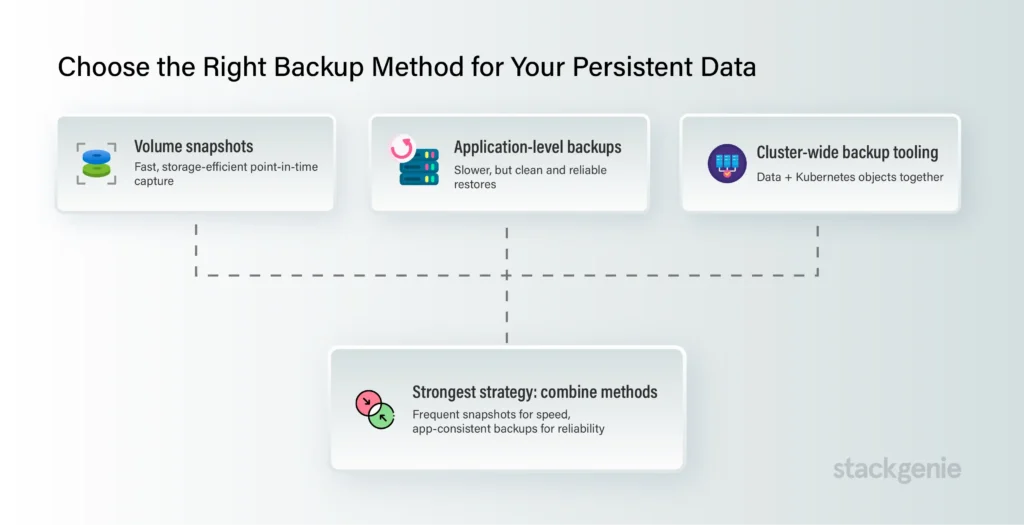
Volume snapshots capture the state of a persistent volume at a moment in time. They’re fast and storage-efficient, and they integrate cleanly with most cloud providers. They’re ideal for quick, frequent point-in-time protection.
Application-level backups use the database’s own tooling to export a consistent copy of the data. These are slower but produce clean, portable backups that restore reliably critical for transactional databases.
Cluster-wide backup tooling captures both your persistent data and your Kubernetes objects together, so you can restore an entire workload not just a disk into the same or a different cluster.
The strongest strategies combine methods: frequent snapshots for speed, plus application-consistent backups for reliability.
Automate Backups So Recovery Isn’t a Fire Drill
Manual backups fail for a predictable reason: humans forget, and outages don’t wait for convenient timing. Every stateful workload should have scheduled, automated backups with clearly defined retention policies daily, hourly, or continuous, depending on how much data loss your business can tolerate.
Two numbers should drive every decision here:
- RPO (Recovery Point Objective) how much data you can afford to lose.
- RTO (Recovery Time Objective) how quickly you must be back online.
Once those targets are set, your backup frequency and method almost choose themselves.
Not sure your current setup can hit the RPO and RTO your business actually needs? Talk to our Kubernetes consulting team we’ll pressure-test your backup and recovery design before an incident does.
Test Your Restores Before Disaster Tests Them for You
A backup you’ve never restored is a guess, not a safeguard. Teams routinely discover mid-incident that their backups were incomplete, misconfigured, or unrecoverable.
Build regular restore drills into your operations. Restore into a separate namespace or cluster, confirm the application starts cleanly, and verify the data is intact and consistent. A tested restore is the only backup you can actually trust.
Documenting these drills also shortens real recovery time, because your team already knows the exact steps instead of improvising under pressure.
Build a Backup Strategy That Scales With Your Clusters
As you grow from one cluster to many across regions, environments, and cloud providers ad hoc backups quickly become unmanageable. A scalable strategy standardizes how every stateful workload is protected, stores backups in a separate failure domain from the source data, and includes cross-region recovery for true disaster resilience.
Getting this right is about design discipline, not just tooling. The teams that recover fastest are the ones who planned for failure before it happened.
Want a backup and disaster-recovery blueprint tailored to your workloads? Book a Kubernetes consulting session with StackGenie and turn “we think we’re covered” into “we know we are.”
StackGenie helps engineering teams design resilient, cost-efficient Kubernetes platforms with knowledge transfer built into every engagement. Explore our Kubernetes consulting services.
Talk to our Kubernetes consulting team?
Contact Us NowFrequently Asked Questions
Q1. What is a Kubernetes backup strategy?
A Kubernetes backup strategy is a structured approach to protecting Kubernetes resources, persistent volume data, and application state so workloads can be restored after accidental deletion, data corruption, cluster failure, or regional outages.
Q2. What should be included in a Kubernetes backup?
A complete Kubernetes backup should protect persistent volume data, Kubernetes resources such as Deployments and StatefulSets, configuration data, secrets, and application-consistent state. Protecting only the volume may leave teams rebuilding the application environment manually.
Q3. How do you back up stateful workloads in Kubernetes?
Stateful Kubernetes workloads can be protected using volume snapshots, application-level database backups, and cluster-wide backup tools. A strong strategy often combines frequent snapshots for fast recovery with application-consistent backups for reliable and portable restoration.
Q4. What are RPO and RTO in Kubernetes disaster recovery?
RPO, or Recovery Point Objective, defines how much data an organization can afford to lose. RTO, or Recovery Time Objective, defines how quickly a workload must be restored. These targets help determine backup frequency, retention, and recovery methods.
Q5. How often should Kubernetes workloads be backed up?
Backup frequency should depend on the workload’s RPO and the amount of data the business can tolerate losing. Critical stateful applications may require hourly or continuous protection, while less critical workloads may be adequately protected with daily backups.
Q6. Why should Kubernetes backups be tested regularly?
A backup that has never been restored cannot be considered reliable. Regular restore drills help teams identify incomplete backups, configuration problems, and recovery issues before an actual outage occurs.
Q7. How can organizations protect Kubernetes backups from disasters?
Kubernetes backups should be stored separately from the source environment and, where required, replicated across regions or failure domains. This helps protect recovery data if an entire cluster, cloud environment, or region becomes unavailable.
Q8. Why do stateful Kubernetes workloads need specialized backup strategies?
Stateful applications such as databases and message queues contain persistent business data that cannot simply be recreated by redeploying a pod. Their backup strategy must protect both the data and the Kubernetes resources required to restore the application consistently.