

Inside this article :
Quick answer: To reduce Amazon EKS costs, start by right-sizing pod CPU and memory requests and removing idle resources. Next, use Karpenter for efficient node provisioning, move interruption-tolerant workloads to Spot Instances, and scale down non-production environments out of hours. Then add cost allocation by team so the savings last.
The migration went well. Workloads moved to Amazon EKS, deployments got faster, and the platform team finally had autoscaling they trusted. Then, around month four, finance flagged the AWS bill. Nothing had broken and traffic had grown only modestly, yet spend was well past forecast.
We have this conversation with engineering leaders all the time. EKS costs rarely spike because of one bad decision. They drift: padded pod requests, nodes that never scale down, forgotten load balancers, cross-AZ traffic nobody watches. And because almost none of it appears on the bill labelled “EKS,” it’s easy to miss.
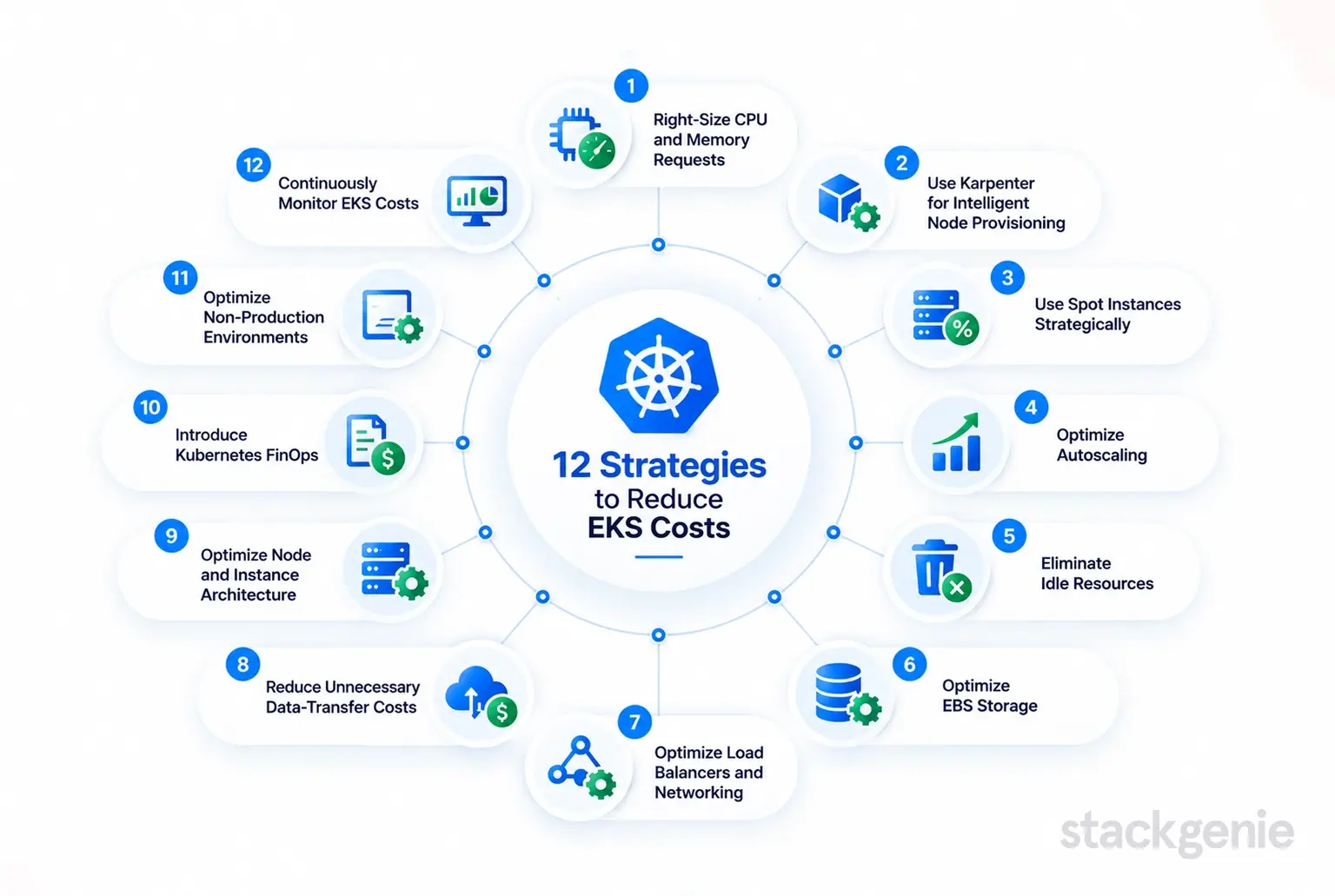
Here are the 12 Amazon EKS cost optimization strategies we use to bring that spend back under control.
12 Strategies to Reduce EKS Costs
- Right-Size CPU and Memory Requests
The scheduler places pods based on requests, not actual usage. When teams pad requests “to be safe,” nodes look full on paper but sit half idle, and you pay for the gap. Compare requests with a few weeks of observed utilization, then adjust. Running the Vertical Pod Autoscaler in recommendation mode takes much of the guesswork out.
- Use Karpenter for Intelligent Node Provisioning
Karpenter launches nodes that fit pending pods, choosing from a wide range of instance types instead of a fixed node group. Its consolidation feature goes further, repacking workloads onto fewer or cheaper nodes and removing empty ones. In our experience, moving to Karpenter is often the single biggest structural improvement in EKS compute efficiency.
- Use Spot Instances Strategically
Spot capacity is heavily discounted, but AWS can reclaim it with a two-minute warning. That makes it a strong fit for stateless services, batch jobs, CI runners and dev environments, and a poor fit for databases or anything that can’t tolerate restarts. Diversify across instance types and Availability Zones, and keep an On-Demand baseline for critical services.
- Optimize Autoscaling
The Horizontal Pod Autoscaler scales pods. Cluster Autoscaler or Karpenter scales nodes. Trouble starts when they’re tuned in isolation: aggressive HPA targets combined with slow node scale-down leave capacity running long after demand drops. Review scale-down delays, set sensible minimum replicas, and check that pod disruption budgets aren’t quietly blocking nodes from draining.
- Eliminate Idle Resources
Every cluster accumulates leftovers: abandoned namespaces, test deployments, orphaned node groups, even whole clusters created for a proof of concept. Each EKS cluster carries its own control plane fee before a single workload runs. Run a quarterly clean-up and make ownership labels mandatory, so “whose is this?” always has an answer.
- Optimize EBS Storage
Persistent volumes are often sized for a worst case that never arrives, and they outlive the pods that used them. Move gp2 volumes to gp3, which has a lower price per GB and lets you provision IOPS and throughput separately from capacity. Set reclaim policies deliberately and hunt down unattached volumes and stale snapshots.
- Optimize Load Balancers and Networking
A LoadBalancer Service for every microservice adds up fast. Consolidate behind a shared ingress, for example using the AWS Load Balancer Controller with IngressGroups. Scrutinize NAT Gateways too: they bill per hour and per gigabyte processed. VPC endpoints for heavily used services such as S3 and ECR can take a lot of that traffic off the NAT path.
- Reduce Unnecessary Data-Transfer Costs
AWS bills traffic between Availability Zones in both directions, and chatty microservices spread across three AZs generate a surprising amount of it. Topology-aware routing keeps traffic local where your resilience requirements allow. Watch inter-region replication and internet egress as well, particularly image pulls, logs shipped off-cluster and calls to third-party APIs.
- Optimize Node and Instance Architecture
AWS positions its Arm-based Graviton instances as offering better price-performance than comparable x86 instances, and most modern container images now ship multi-arch builds. Match instance families to workload profiles: memory-optimized for caches, compute-optimized for CPU-bound services. Avoid running everything on one oversized, general-purpose node group.
- Introduce Kubernetes FinOps
You can’t reduce costs nobody owns. Tag AWS resources consistently, label workloads by team, product and environment, and allocate spend back to those owners through showback reports. When engineering teams see their own namespace costs every month, behavior changes faster than it does under any top-down mandate.
- Optimize Non-Production Environments
Dev, QA and staging clusters often mirror production sizing and run around the clock, even though nobody uses them overnight or at weekends. Scale them down outside working hours with scheduled scaling, run them largely on Spot, and question whether every team really needs a dedicated cluster rather than a namespace.
- Continuously Monitor EKS Costs
Use AWS Cost Explorer for account and service-level trends, with split cost allocation data for EKS for pod-level visibility. Add CloudWatch Container Insights for utilization and Kubecost for namespace and workload allocation. Then put a recurring cost review on the calendar, because spend creeps back up as soon as attention moves elsewhere.
EKS Cost Optimization Priority Table
| Strategy | Effort | Potential Impact | Start Here? |
|---|---|---|---|
| Right-size requests | Medium | High | Yes |
| Eliminate idle resources | Low | Medium | Yes |
| Optimize autoscaling | Medium | High | Yes |
| Karpenter | Medium | High | Yes |
| Spot Instances | Medium | High | Yes |
| Kubernetes FinOps | Medium | High | Yes |
| Non-production environments | Low | Medium | Next |
| EBS storage | Low | Medium | Next |
| Continuous monitoring | Low | Medium | Next |
| Load balancers and networking | Medium | Medium | Later |
| Node and instance architecture | Medium | Medium | Later |
| Data-transfer costs | High | Medium | Later |
Where Should You Start?
Don’t attempt all 12 at once. Change requests, node provisioning and purchasing options in the same sprint, and you won’t know which change caused the next performance regression. We recommend this order:
- Resource right-sizing
- Idle resource identification
- Autoscaling
- Karpenter
- Spot Instances
- FinOps visibility
Right-sizing and clean-up come first because every later step depends on accurate requests and a clean inventory. Karpenter and Spot amplify savings only once workloads are sized properly. Judge every change against four criteria: cost, performance, reliability and scalability. A cheaper cluster that breaches its SLOs isn’t optimized.
Common EKS Cost Optimization Mistakes
- Moving everything to Spot. Stateful and latency-sensitive services need a stable baseline.
- Cutting resources without monitoring. Shrink requests, then watch CPU throttling, OOM kills and latency before going further.
- Ignoring networking costs. NAT, cross-AZ and load balancer charges can quietly become a large share of the bill.
- Optimizing only production. Non-production environments often hold the easiest savings.
- Treating it as a one-time exercise. Without ownership and regular reviews, costs drift straight back.
The Bottom Line
Amazon EKS cost optimization isn’t about simply spending less. It’s about running the right infrastructure for each workload while protecting performance, reliability and scalability. The teams that get this right treat cost as an engineering signal, reviewed alongside latency and error rates, not a finance problem handed to engineering once a quarter.
If your EKS bill is growing faster than your traffic, a structured assessment is usually the quickest way to find out why. Our Kubernetes consulting team runs EKS cost assessments that show where spend is leaking and leave your engineers with a prioritized plan they can own.
Ready to Reduce Your EKS Costs? Talk to Stackgenie.
Contact Us NowFrequently Asked Questions
- How can I reduce Amazon EKS costs?
You can reduce Amazon EKS costs by right-sizing pod CPU and memory requests, removing idle resources, optimizing autoscaling, using Karpenter for efficient node provisioning, and moving suitable workloads to Spot Instances. Storage, networking, non-production environments, and ongoing cost visibility should also be optimized. Amazon EKS Cost Optimization
- How does Karpenter help reduce EKS costs?
Karpenter dynamically provisions nodes based on pending pod requirements and can select from a broader range of instance types. Its consolidation capabilities can repack workloads onto fewer or lower-cost nodes and remove unnecessary capacity, improving EKS compute efficiency. Amazon EKS Cost Optimization
- Are Spot Instances suitable for Amazon EKS workloads?
Spot Instances are well suited to interruption-tolerant workloads such as stateless services, batch jobs, CI runners, and development environments. Critical databases and workloads that cannot tolerate interruptions should generally retain a stable On-Demand baseline. Amazon EKS Cost Optimization
- How does right-sizing reduce Amazon EKS costs?
Kubernetes schedules pods based on their requested CPU and memory resources. Overly large requests can cause nodes to appear full even when actual utilization is low. Comparing resource requests with observed utilization and adjusting them can reduce wasted capacity. Amazon EKS Cost Optimization
- How can I reduce EKS networking and data-transfer costs?
Organizations can reduce networking costs by consolidating services behind shared ingress, reviewing NAT Gateway usage, using VPC endpoints for heavily used AWS services, and keeping traffic local where resilience requirements allow. Cross-AZ traffic, inter-region replication, and internet egress should also be monitored. Amazon EKS Cost Optimization
- How can Kubernetes FinOps help with EKS cost optimization?
Kubernetes FinOps creates visibility and ownership around cloud spending by consistently tagging AWS resources, labeling workloads by team, product, and environment, and allocating costs through showback reporting. This helps engineering teams understand and manage the cost of their workloads. Amazon EKS Cost Optimization
- How can I reduce EKS costs in development and staging environments?
Non-production environments can often be scaled down outside working hours, run largely on Spot capacity, and consolidated where appropriate. Teams should also evaluate whether each team needs a dedicated cluster or whether namespaces can provide sufficient isolation. Amazon EKS Cost Optimization
- How should organizations continuously monitor Amazon EKS costs?
Use AWS Cost Explorer for account and service-level trends, EKS split cost allocation data for pod-level visibility, CloudWatch Container Insights for utilization, and tools such as Kubecost for namespace and workload allocation. Regular cost reviews help prevent spending from gradually increasing again. Amazon EKS Cost Optimization


